if (!require("pacman")) install.packages("pacman", repos = "https://cran.r-project.org")
pacman::p_load(dplyr, tidyr, tibble, ggplot2, scales, stringr, mgcv, rioja, neotoma2, marquee)4 Visualising data
4.1 Background
One of the most common methods of plotting palaeoecological data (such as pollen, but often including diatoms, isotopes, and other palaeoecological data) is to create stratigraphic plots. Palaeodata are regularly visualised with age (usually the output of an age-depth model) on the y-axis, with the youngest age at the top, to mirror a core-type sample. Each taxon is plotted in sequence horizontally, in order of abundance. Taxonomic data, such as pollen or diatoms, are also usually converted to relative abundances before plotting. While the relative abundances do help visualise the proportion of each taxon through time (and absolute abundances are unavailable), this also means that the plots can be misleading. For example, if all taxa were to decline equally, then the figure would not change at all! Or the rise of a taxon could be due to the decline of others. Of course, this is not the only method of visualising palaeoecological data, and other layouts can be equally good; however, we will demonstrate the most common convention in this chapter. We will do so using the ggplot2 package and the rioja package.
4.2 Getting started
NotePackages required for this section
TipRespawn code
This is the same Devil’s Lake download used in Chapter 3 and Chapter 5, filtered to datasettype == "pollen", harmonised the same way, and converted to proportions.
if (!file.exists("./data/devils_dl.rds")) {
  devils_dl <- get_sites(siteid = 666) %>%
    get_datasets(all_data = TRUE) %>%
    neotoma2::filter(datasettype == "pollen") %>%
    get_downloads()
  saveRDS(devils_dl, "./data/devils_dl.rds")
} else {
  devils_dl <- readRDS("./data/devils_dl.rds")
}
Most stratigraphic plots you will see have taxa converted to relative abundances. The following code converts observations from counts (NISP) to proportions. In this section we will not go into detail on the samples() function or the conversion to proportions as this is covered in Chapter 2 and Chapter 5.
devils_samples <- samples(devils_dl) %>%
  dplyr::filter(ecologicalgroup %in% c("UPHE", "TRSH"),
                elementtype == "pollen",
                units == "NISP")

devils_harm_prop <- devils_samples %>%
  mutate(variablename = replace(variablename,
                                stringr::str_detect(variablename, "Pinus.*"),
                                "Pinus")) %>%
  group_by(siteid, sitename, sampleid, variablename, units,
           age, agetype, depth, datasetid, long, lat) %>%
  summarise(value = sum(value), .groups = "drop") %>%
  group_by(age) %>%
  mutate(pollencount = sum(value, na.rm = TRUE),
         prop        = value / pollencount) %>%
  ungroup() %>%
  arrange(desc(age))
4.3 Stratigraphic diagrams
In most publication-ready figures, you would plot as many taxa and functional groups as possible. For this demonstration we will plot the 6 most abundant species so that they fit more easily on the rendered page. We will do this simply by summing the taxa through time and picking the top 6:
devils_top_taxa <- devils_harm_prop %>%
  group_by(siteid, sitename, variablename) %>%
  summarise(total = sum(value), .groups = "drop") %>%
  arrange(desc(total))
Of course, this is an over-simplification since ecologically important does not necessarily also mean most abundant! It serves the purpose of having something to plot.
focal <- devils_top_taxa$variablename[1:6]
# Filter to include only top 6 taxa
devils_focal <- devils_harm_prop %>%
  dplyr::filter(variablename %in% focal)
4.3.1 Building a stratigraphic plot with ggplot2
Let’s start with the simplest thing that works: proportion against age, one panel per taxon. coord_flip() puts age on the vertical axis and scale_x_reverse() makes age run downwards, so the oldest sample sits at the bottom. facet_wrap() splits each taxon (variablename) into one panel per taxon. We will incrementally build up from a basic plot to a fleshed-out example with correct details. If you are unfamiliar with ggplot, try commenting out or removing lines systematically, rerunning the code each time to see the difference.
ggplot(devils_focal, aes(x = age, y = prop)) +
  geom_area(fill = "grey25") +
  scale_x_reverse() +
  scale_y_continuous() +
  labs(x = "Age (cal years BP)", y = "Pollen proportions") +
  coord_flip() + # confusingly age is the x label because of coord_flip()
  facet_wrap(~variablename, nrow = 1) + # makes each taxa its own panel
  theme_minimal()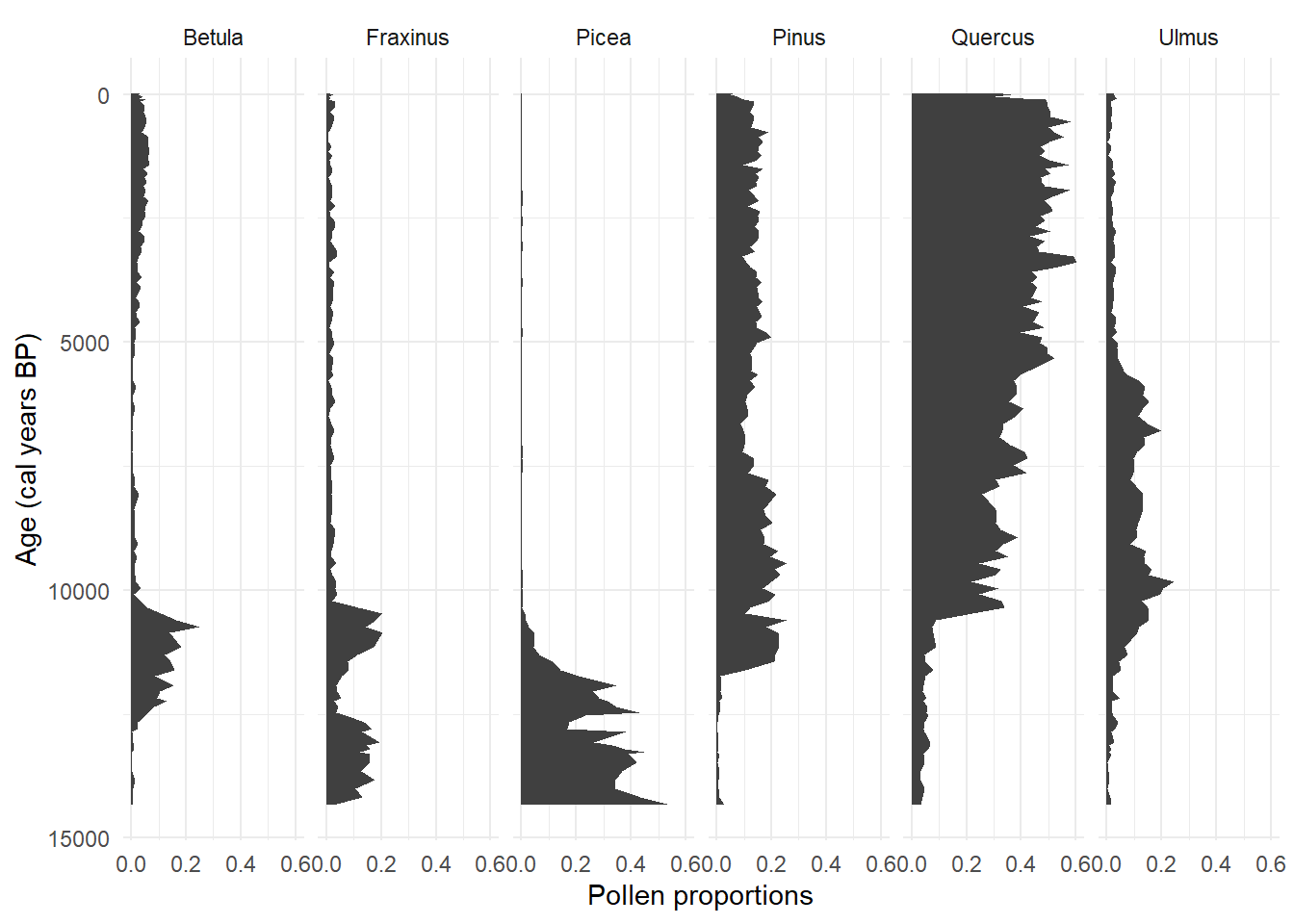
Now let’s start improving on this base plot Figure 4.1! Using a filled area is common; however, the fill implies a continuous record and the core was sampled at discrete intervals. Everything between two samples is drawn by the plotting function, not measured. Adding a segment at each sampled age shows where the observations actually are. The density of observations through time is very important, and it is a common mistake not to include them in stratigraphic plots! Currently, the panels are also in alphabetical order by default. Ordering by abundance is tidier and conveys relative abundance along the horizontal alignment of panels. To do this ggplot2 likes to have the taxa as factor data, so let’s convert the taxa names to factor data:
# convert taxa to factor, see <fct> now appears in the
# variablename column if you print the tibble?
devils_focal <- devils_focal %>%
  mutate(variablename = factor(variablename, levels = focal))
Now rebuild the plot with geom_segment() to add the sampling locations, and rebuild with the variablename as a factor:
ggplot(devils_focal, aes(x = age, y = prop)) +
  geom_area(fill = "grey25") +
  geom_segment(aes(x = age, xend = age, y = 0, yend = prop),
               colour = "grey40", linewidth = 0.3) +
  scale_x_reverse() +
  scale_y_continuous() +
  labs(x = "Age (cal years BP)", y = "Pollen proportions") +
  coord_flip() + # confusingly age is the x label because of coord_flip()
  facet_wrap(~variablename, nrow = 1) + # makes each taxa its own panel
  theme_minimal()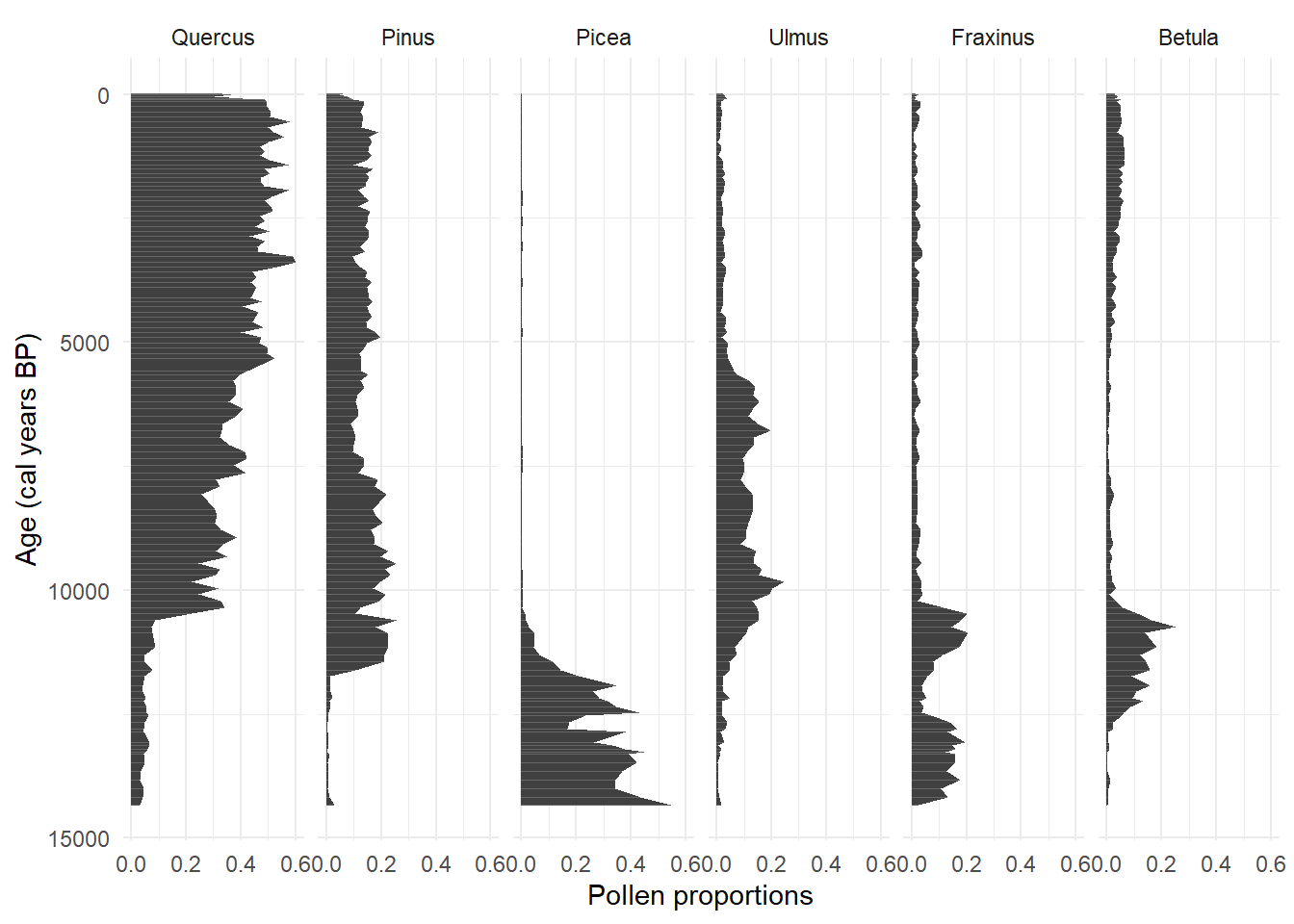
Now we’re getting somewhere!
4.3.1.1 Formatting taxon names
By convention genus and species names are italic, the genus is capitalised and the species is not (e.g., Quercus alba). The marquee package renders markdown inside ggplot2 theme elements, so a label is written the way it would be written using markdown syntax. Markdown is a featherweight plain text format that is super easy to use and commonplace in programming. There are many, many ways of achieving the same aim in ggplot2; I find markdown elements the simplest.
Let’s create some labels for ggplot2. Since there are only 6 taxa, we can easily enough create matching pairs manually:
taxon_names <- c(
  Quercus  = "*Quercus* spp.",
  Pinus    = "*Pinus* spp.",
  Picea    = "*Picea* spp.",
  Ulmus    = "*Ulmus* spp.",
  Fraxinus = "*Fraxinus* spp.",
  Betula   = "*Betula* spp."
)

# raise an error if anything changes and taxon names do not match.
stopifnot(all(focal %in% names(taxon_names)))
Alternatively, we can take a simple programmatic approach:
markdown_names <- paste0("*", focal, "* spp.")
taxon_names_prog <- setNames(markdown_names, focal)
stopifnot(all(focal %in% names(taxon_names_prog)))
For more complex lists of species names, you can take a rule-based approach with lots of regular expressions (regex) to find and match patterns like undiff., -type, and subg. Pattern matching text got much easier with the help of artificial intelligence, so generating labels is not a hard task now (it used to be challenging to safely/correctly match all the tricky taxon names as well as isotopes with the correct notation!).
Remember that the taxa are split into facets? Thus, it is the facet strip labels that need to be modified. as_labeller() puts the formatted strings into the facet strips, and element_marquee() tells ggplot2 to render the markdown rather than print it. Both are needed: the labeller alone would show the asterisks. Now the same plot with the segments, the ordering and the names:
ggplot(devils_focal, aes(x = age, y = prop)) +
  geom_area(fill = "grey25") +
  geom_segment(aes(x = age, xend = age, y = 0, yend = prop),
               colour = "grey40", linewidth = 0.3) +
  scale_x_reverse(name = "Age (cal years BP)", labels = label_comma()) +
  scale_y_continuous(name = "Proportion of the pollen sum",
                     labels = label_percent(), n.breaks = 3) +
  coord_flip() +
  facet_wrap(~variablename, nrow = 1,
             labeller = as_labeller(taxon_names)) +
  theme_minimal() +
  theme(strip.text        = element_marquee(),
        panel.spacing.x   = unit(0.9, "lines"),
        panel.grid.minor  = element_blank(),
        axis.text.x       = element_text(size = 7))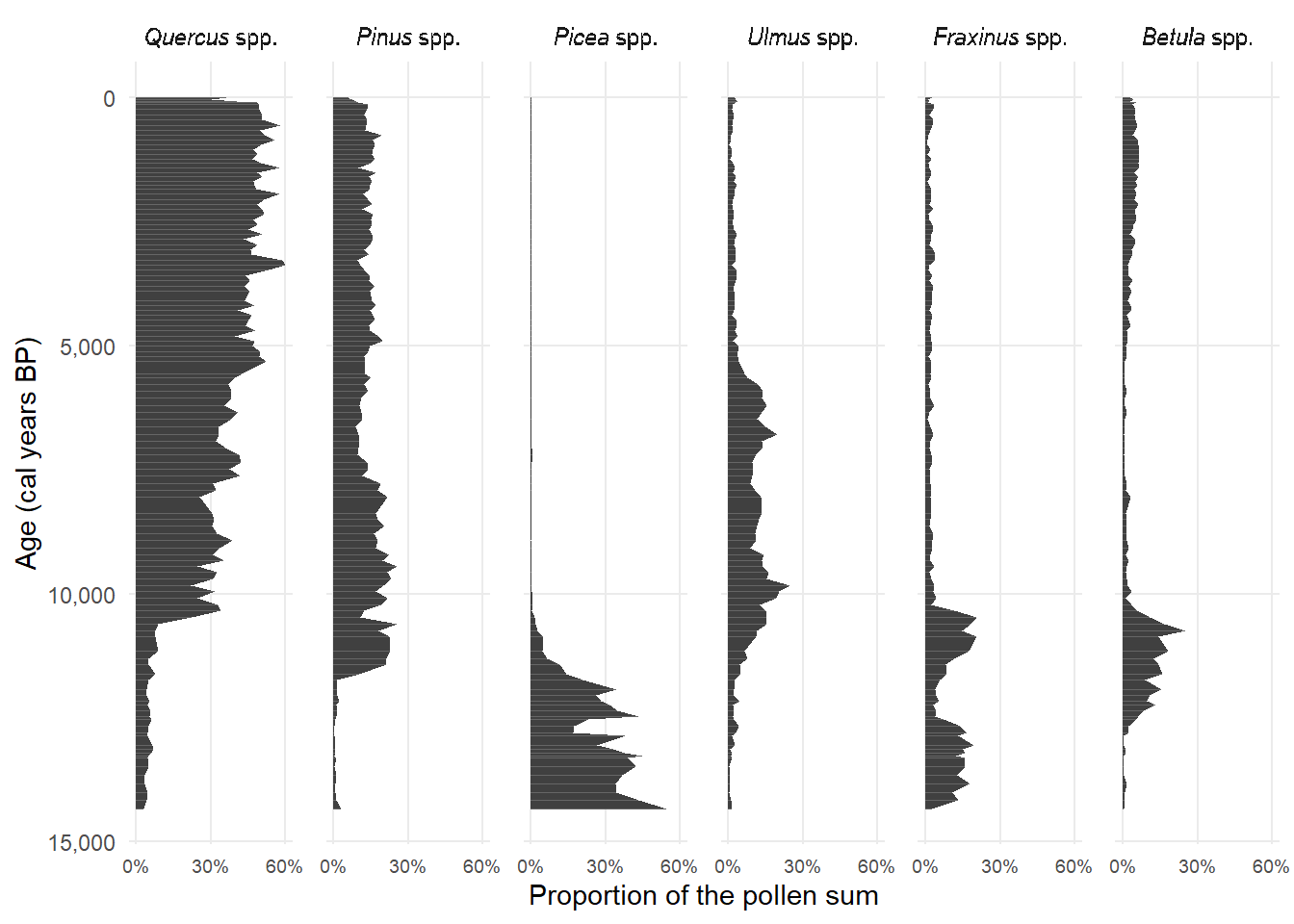
Notice that we also included some optional cosmetic changes like percent on the x-axis using label_percent() and label_comma() to the ages on the y-axis. If you need to place multiple ggplot objects in the same figure, the patchwork package works very well with ggplot2.
Exercise 4.1
facet_wrapincludes optional arguments"fixed","free","free_x", and"free_y". Experiment with the alternative arguments tofacet_wrapand discuss the consequences of how proportions are visualised.
NoteAssumptions of stratigraphic plots of taxa 🧙
When plotting relative abundances, that the taxa are not independent of each other. As noted in Section 4.1, a perceived increase in one taxon may be driven by the decrease in other species.
Chronological uncertainties are not visually accounted for. Chapter 3 covers how important the age-depth uncertainties can be and that only considering the median density can lead to incorrect conclusions. Common errors in palaeoecology are to: (i) infer the timing of ecological events from stratigraphic diagrams that do not account for chronological uncertainty; and (ii) plot data from multiple cores against a single chronology to infer the synchroneity of events across space without due consideration of the compounded chronological uncertainties. Although these considerations are important to visualisation and interpretation, we will not attempt to tackle such big issues in this chapter. If you are interested, here are a few papers:
Exercise 4.2 Take Devil’s Lake, or another site of your choosing.
Rebuild the chronology with
Bchron, following Chapter 3, three times: once with the complete chronological control data, which is your reference point, and twice more with the control data artificially downsampled by removing rows. Keep the first and last control in each downsampled version.Artificially downsample the pollen data twice, again by removing rows. The complete dataset is your reference point here too.
You now have three chronologies and three pollen datasets. Plot combinations of the two to see the effect of reduced temporal resolution in the chronological controls and in the pollen separately.
4.3.2 Stratigraphic diagram with rioja
The rioja package is built for visualising palaeoecological data and has some handy features like including CONISS (Grimm 1987) constrained cluster analysis that splits the record into zones (we will talk more about calculating dissimilarity/similarity in Chapter 5). While rioja has useful features, it is an older package. In this section we will demonstrate how it works, but the chapter will primarily focus on using ggplot2 which is the most frequently used graphics package in R and is actively maintained.
Two things are worth knowing before reading the code. Firstly rioja draws in base graphics rather than ggplot2, so the syntax is not transferable. For example italics come from a plotmath expression rather than the markdown marquee understands, and the two are not interchangeable. Secondly, rioja places the plot using figure coordinates running from 0 to 1, rather than the margins base graphics normally uses, so xLeft, xRight and yTop are what you adjust when something is cut off at an edge. Unlike ggplot2 which usually likes to work with long data, rioja takes wide format. So, let’s pivot our data to wide format:
devils_wide <- devils_harm_prop %>%
  dplyr::select(age, variablename, prop) %>%
  dplyr::filter(variablename %in% focal) %>%
  tidyr::pivot_wider(id_cols = age,
                     names_from  = variablename,
                     values_from = prop,
                     values_fill = 0)

head(devils_wide)
# calculate clusters using CONISS. This is over-simplified to 6 species for this demonstration!
devils_clust <- rioja::chclust(dist(sqrt(devils_wide[, -1])), method = "coniss")
devils_matrix <- as.data.frame(devils_wide[, -1] * 100)
# rioja draws in base graphics, so the labels are plotmath expressions rather than
# the markdown marquee used above. Supply them in the ORIGINAL column order:
# wa.order reorders the panels and carries the labels along with them.
taxon_expr <- parse(text = paste0("italic('", names(devils_matrix), "')~'spp.'"))
strat <- rioja::strat.plot(devils_matrix,
yvar = devils_wide$age,
ylabel = "Age (cal years BP)",
x.names = taxon_expr,
y.rev = TRUE,
clust = devils_clust,
wa.order = "topleft",
scale.percent = TRUE,
# everything below is layout. rioja positions the plot in
# figure coordinates, 0 to 1, rather than using margins.
xLeft = 0.12, # left edge, room for the y label (default 0.07)
xRight = 0.94, # right edge, room for the dendrogram (default 1)
yTop = 0.75, # top edge, room for the rotated names (default 0.8)
xSpace = 0.025, # gap between panels (default 0.01)
ylabPos = 3.2, # y label distance from the axis (default 2)
clust.width = 0.12, # width of the dendrogram (default 0.1)
cex.ylabel = 0.9,
cex.xlabel = 0.85,
cex.yaxis = 0.7,
cex.axis = 0.65)
# identify zones from CONISS clustering
rioja::addClustZone(strat, devils_clust, 4, col = "red")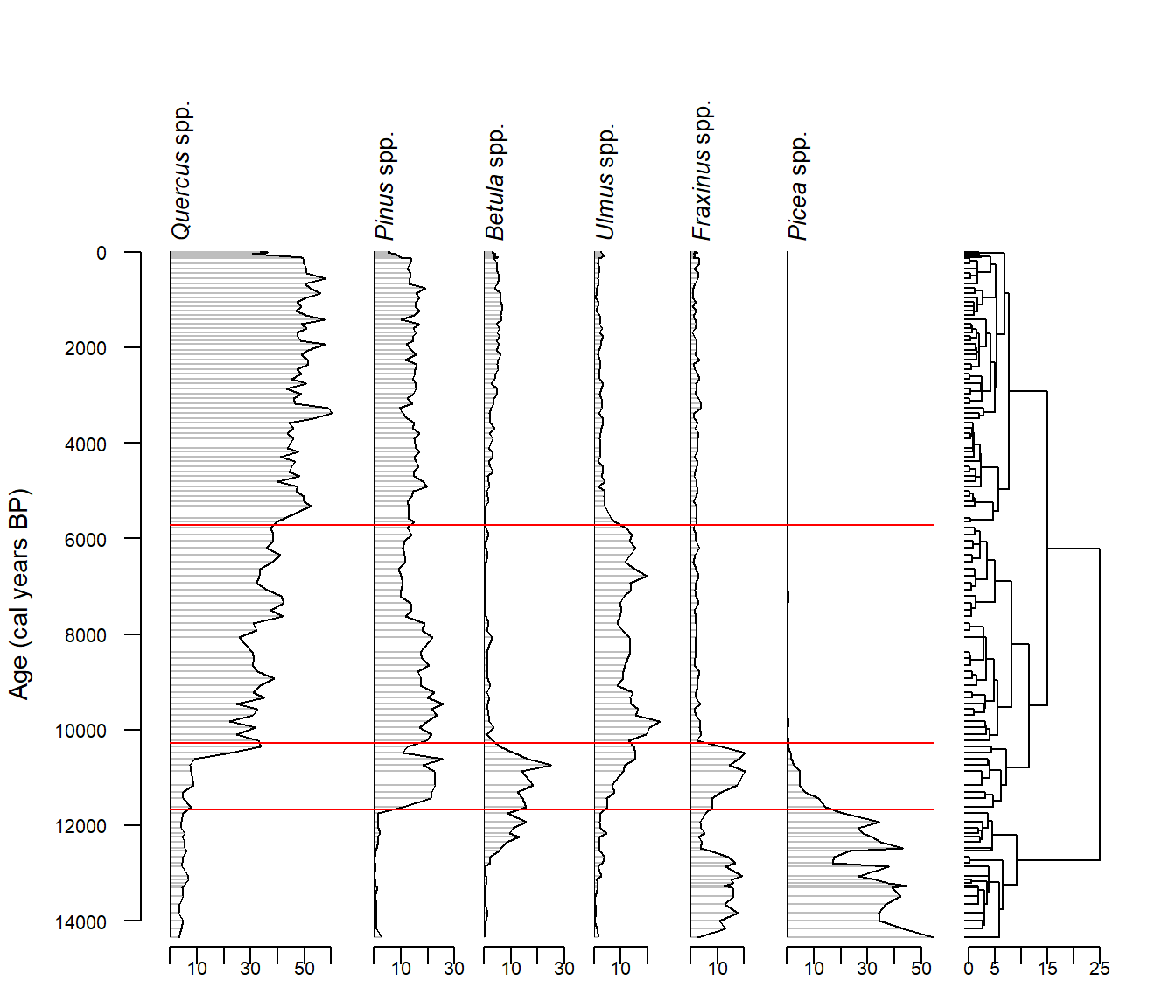
rioja::strat.plot(), with a CONISS dendrogram on the right and four zones marked in red. wa.order sorts the taxa by weighted average age, so the panel order differs from the previous figure.
It can be a bit fiddly to correct the layout in rioja, but this is also true of ggplot2 when figures get complicated. Drawing plots entirely from data can be time consuming but has the benefit of reproducibility.
TipGood practice tip
You will want to save your figures to disk after they have been created. The graphics viewer in your IDE (e.g., RStudio or VS Code) does not display figures on-screen the same as they will appear when saved to disk. If you screenshot or copy from the graphics console, you will not be able to create the same figure dimensions twice and will have lots of problems downstream! Here are some tips for creating good, publication-ready, graphics:
- Define overall figure dimensions: this is easily done with
ggsave()by defining thewidthandheightarguments. Defining the correct figure size for a page or a slide will mean that you don’t need to resize it (shrinking or blowing up fonts and other elements) when you place them in a document or presentation. - Define all font sizes. These are easily fixed in
ggplot2themesection. That way, on the printed page you can make sure labels are visible and consistent at a chosen font size (e.g., axis labels will be font size 10 across all your figures). You can make many other cosmetic adjustments in thethemetoo. - Save plot as a vector graphic format like
svgorpdf, not as a raster format likejpegorpngunless absolutely necessary. Vector formats are much sharper and clearer. And if you need to adjust the figure in another software like Inkscape, each element will be a selectable/editable layer (a raster graphic will appear as like a photograph in the editor). - It is worth using a colour palette designed for contrast and colourblind friendliness.
RColorBrewerandviridiscan be aesthetic as well as functional.
4.4 Taxa across space and time
The above sections cover creating a stratigraphic diagram for a single site. Don’t forget that the data downloaded from neotoma2 contain many, many (many!) variables that can be used for data exploration. Let’s have a look at a couple of other exploratory figures we could make from the multi-site object covering all of the state of Michigan downloaded in Chapter 2. One site gives a history. Many sites give a geography as well. For demonstration purposes, we will load the data, filter for only records containing pollen data, and do a quick-and-dirty harmonisation for pine species:
mich_dl <- readRDS("./data/mich_dl.rds")4.4.1 Taxa distribution and rarity
The taxa() function summarises the taxa across sites in one table: for every taxon, how many sites and how many samples it turns up in. Let’s explore how we can use the taxa table to produce exploratory plots of the multisite data. First, we need to apply the same filters to the taxa table as to the samples table:
mich_taxa <- neotoma2::taxa(mich_dl) %>%
  dplyr::filter(ecologicalgroup %in% c("UPHE", "TRSH"), elementtype == "pollen")

cat("Total taxa: ", nrow(mich_taxa), "\n",
    "Number of taxa that occur only in one site: ", sum(mich_taxa$sites == 1), "\n",
    "Number of taxa that occur in every site: ", sum(mich_taxa$sites == max(mich_taxa$sites)), "\n")
Total taxa: 220
Number of taxa that occur only in one site: 97
Number of taxa that occur in every site: 7 ggplot(mich_taxa, aes(x = sites, y = samples)) +
geom_point(alpha = 0.5, size = 1.6) +
scale_y_log10(labels = label_comma()) +
labs(x = "Number of sites the taxon occurs in",
y = "Number of samples the taxon occurs in") +
theme_minimal()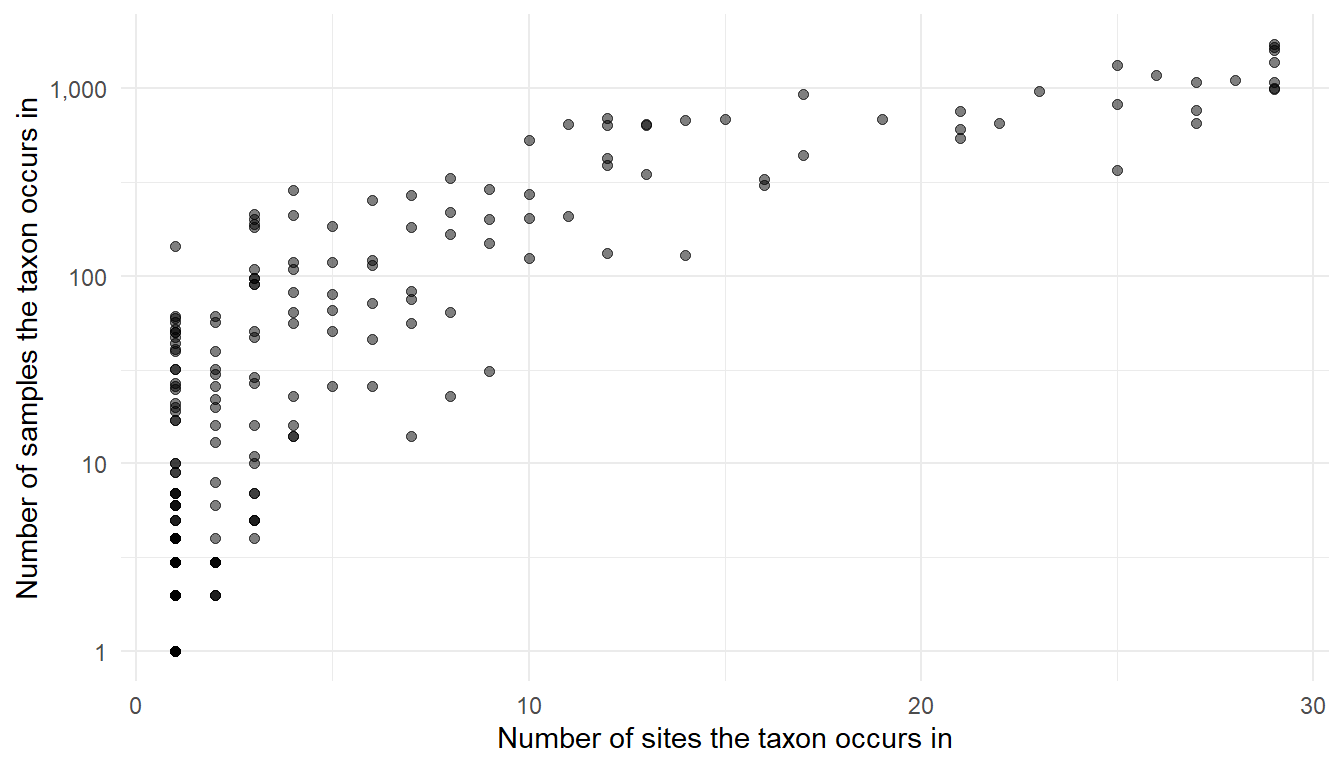
r dplyr::n_distinct(allSamp$siteid) Michigan sites, by the number of sites and the number of samples it occurs in. Most taxa are rare. Note that the y-axis is logarithmic.
Most taxa are rare: nearly half of the taxa (97) occur at a single site, and only a handful (7) occur at all sites. This demonstrates a core ecological concept: that common taxa are rare!
In the stratigraphic plot demonstration we picked the top 6 species by count (purely for demonstration). Figure 4.5 demonstrates why. Ecologically, we would not want to throw out rare species! Such simplicity does not take into account important considerations such as functional importance, that total abundance by count may be skewed by taxa that produce a lot of pollen, and total abundance does not reflect compositional change over time.
4.4.2 How much data does each site have?
Palaeoecological datasets differ enormously in how many samples were taken and what period they cover. For any multi-site comparison it is important to know the sampling intensity and temporal coverage. The following code loads up the samples data from the Michigan sites, deals with the duplicate name (“Green lake”), and creates a summary object site_cover that checks how many samples a site has, and whether the dataset covers the whole of the Holocene period.
allSamp <- samples(mich_dl) %>%
  dplyr::filter(ecologicalgroup %in% c("UPHE", "TRSH"),
                elementtype == "pollen",
                units == "NISP") %>%      # the units filter matters, see @sec-neotoma2
  mutate(variablename = replace(variablename,
                                stringr::str_detect(variablename, "Pinus.*"),
                                "Pinus"))

dplyr::n_distinct(allSamp$siteid)
[1] 29# two Michigan sites are both called "Green Lake", so the name alone is not a key
# For analyses, use siteid (not sitename), which is unique per site
# Below we do a little tidying so that the figure displays the site name
# alongside the ID for the common case where two sites have the same name!
mich_samp <- allSamp %>%
distinct(siteid, sitename, sampleid, age, age_range_young, age_range_old) %>%
group_by(sitename) %>%
mutate(site_label = if (dplyr::n_distinct(siteid) > 1)
paste0(sitename, " (", siteid, ")") else sitename) %>%
ungroup()
site_cover <- mich_samp %>%
group_by(siteid, site_label) %>%
summarise(n_samples = n(),
age_range_young = min(age_range_young),
age_range_old = max(age_range_old), .groups = "drop") %>%
mutate(spans = age_range_young <= 0 & age_range_old >= 11700)
head(site_cover$n_samples, n = 20) [1] 15 75 56 62 74 38 35 45 73 36 24 51 69 55 173 151 36 27 36
[20] 31We can left_join the summary table (site_cover) to the original samples table so that we can use the summary information in combination with the samples data and make a new plot. We are also going to convert the site_label to a factor ordered by the number of samples, so that the plot will display the sites in order of the number of samples, rather than alphabetically.
mich_samp_join <- mich_samp %>%
  left_join(dplyr::select(site_cover, siteid, spans), by = "siteid") %>%
  mutate(site_label = factor(site_label,
                             levels = site_cover$site_label[order(site_cover$n_samples)]),
         ypos       = as.numeric(site_label))
head(mich_samp_join)
# A tibble: 6 × 9
siteid sitename sampleid age age_range_young age_range_old site_label spans
<int> <chr> <int> <dbl> <dbl> <dbl> <fct> <lgl>
1 294 Bondi Se… 5879 13131 13131 13240 Bondi Sec… FALSE
2 294 Bondi Se… 5880 13137 13131 13240 Bondi Sec… FALSE
3 294 Bondi Se… 5881 13142 13131 13240 Bondi Sec… FALSE
4 294 Bondi Se… 5882 13145 13131 13240 Bondi Sec… FALSE
5 294 Bondi Se… 5883 13150 13131 13240 Bondi Sec… FALSE
6 294 Bondi Se… 5884 13155 13131 13240 Bondi Sec… FALSE
# ℹ 1 more variable: ypos <dbl>This type of data wrangling (filtering, pivoting, splitting, summarising, re-joining…) is very common in data analyses and creating visualisations. It is worth getting to grips with conceptually, to help you understand what can be done with data. Now that we have done some data wrangling, let’s make a figure!
ggplot(mich_samp_join, aes(x = age, y = site_label)) +
  geom_line(aes(group = site_label), colour = "grey80", linewidth = 0.4) +
  geom_segment(aes(x = age, xend = age, y = ypos - 0.32, yend = ypos + 0.32),
                   linewidth = 0.35) +
  geom_vline(xintercept = c(11700), linetype = "dashed", colour = "red") +
  scale_x_reverse(name = "Age (cal years BP)", labels = label_comma()) +
  labs(y = NULL) +
  theme_minimal() +
  theme(legend.position = "top", panel.grid.minor = element_blank(),
        axis.text.y = element_text(size = 7))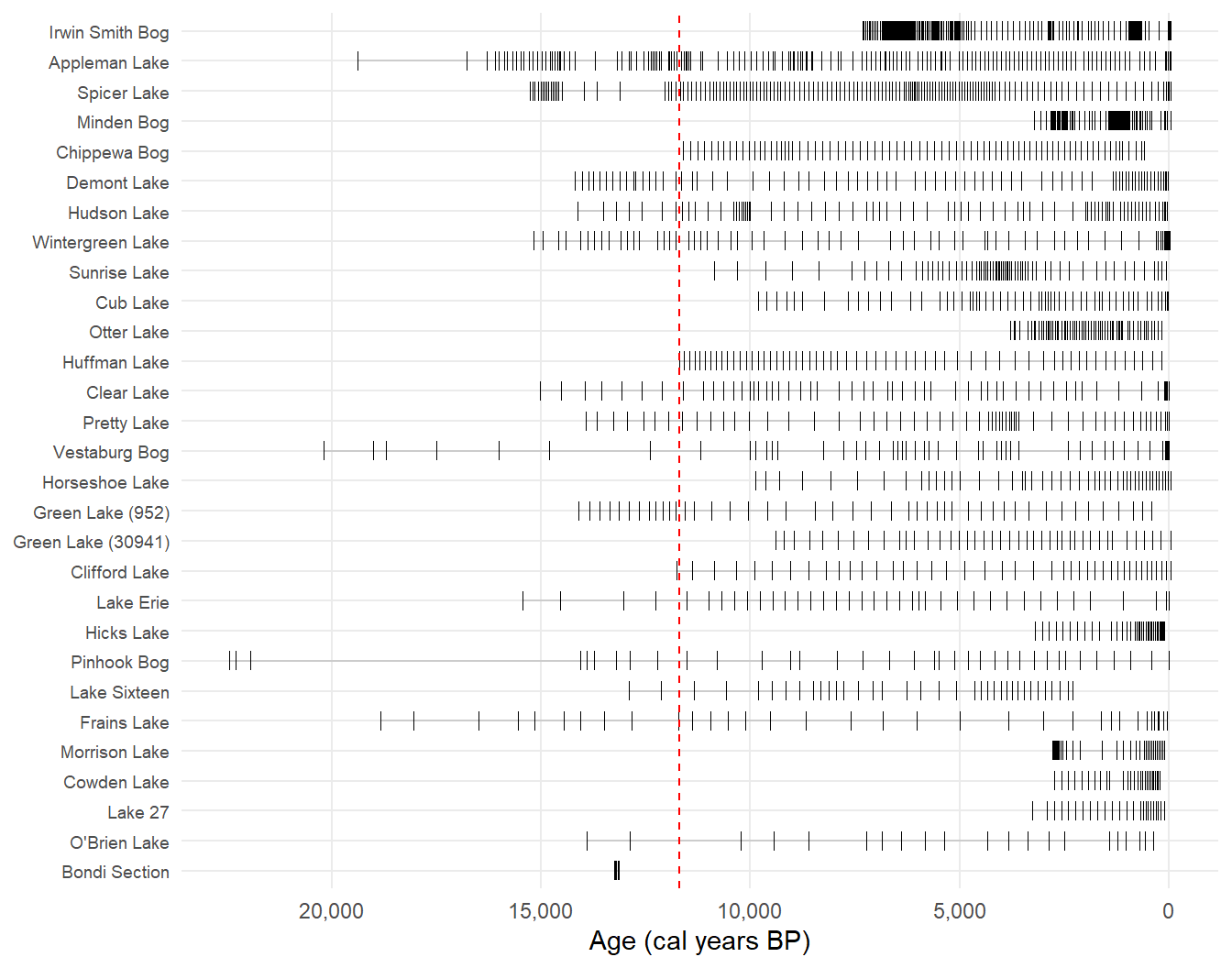
Figure 4.6 provides a great visual summary of the Michigan data, each row mirrors the core itself! We can see from the vertical dashed red line which datasets cover the whole Holocene period (or more), and we can see the sampling intensity per site. Irwin Smith Bog was intensively sampled but does not extend over the Holocene, O’Brien Lake covers the Holocene but consists of few samples, and Bondi Section (appropriately named) holds 15 samples spanning barely a century, all of them pre-Holocene.
4.4.3 Curating a comparable subset of sites
If we want to only include sites that have Holocene coverage we can use age_range_young and age_range_old to filter the metadata. We already created the site_cover table that has a TRUE/FALSE column that identifies which sites cover the Holocene period, so it is easy to use that to filter siteids.
spanning <- site_cover %>%
  dplyr::filter(age_range_young <= 0, age_range_old >= 11700)

mich_holo <- allSamp %>% dplyr::filter(siteid %in% spanning$siteid)

cat("All Michigan sites: ", dplyr::n_distinct(allSamp$siteid), "\n",
    "All Michigan samples ", dplyr::n_distinct(allSamp$sampleid), "\n",
    "Sites filtered to span the Holocene ", dplyr::n_distinct(mich_holo$siteid), "\n",
    "Total Holocene samples ", dplyr::n_distinct(mich_holo$sampleid), "\n")
All Michigan sites: 29
All Michigan samples 1740
Sites filtered to span the Holocene 12
Total Holocene samples 810 This demonstrates a common challenge in palaeoecology: curation is expensive! Filtering by temporal extent alone removes more than half the data. If we were to go on to filter by additional criteria such as available covariates, chronological controls (i.e., a minimum number of radio carbon dates), and sampling intensity, we would lose many more sites.
WarningOh no! 😱
age_range_young and age_range_old describe the dataset as uploaded, not the samples left after filtering, and the two can differ by a great deal. Restricting to upland herbs, trees and shrubs counted as NISP throws away whatever else the core held, so the age range you are left with is usually narrower than the range the metadata advertises. Check the samples you kept rather than trusting the metadata:
mich_holo %>%
  group_by(sitename) %>%
  summarise(metadata_oldest = max(age_range_old),
            oldest_kept     = round(max(age)), .groups = "drop") %>%
  mutate(difference = metadata_oldest - oldest_kept) %>%
  arrange(desc(difference))
# A tibble: 12 × 4
sitename metadata_oldest oldest_kept difference
<chr> <dbl> <dbl> <dbl>
1 Pinhook Bog 38301 22453 15848
2 Frains Lake 33542 18841 14701
3 Demont Lake 15783 14181 1602
4 Appleman Lake 20635 19383 1252
5 Huffman Lake 12347 11703 644
6 Clifford Lake 12100 11762 338
7 Spicer Lake 15536 15252 284
8 Clear Lake 15014 15014 0
9 Lake Erie 15444 15444 0
10 Pretty Lake 13930 13930 0
11 Vestaburg Bog 20200 20200 0
12 Wintergreen Lake 12786 15169 -2383Pinhook Bog advertises a record reaching past 38,000 years, while the pollen we kept stops at about 22,000. Note also that the difference runs both ways: Wintergreen Lake’s samples reach older than its metadata claims.
4.4.4 Comparing multisite data
Because each core has its own sampling intensity and age-depth model, observations from two or more sites will not align in time. A common approach to get around this issue is to bin data at a given resolution so that samples across datasets occur within the same bin. This is quite a dangerous approach given chronological uncertainties and the effects of different bin widths. Narrow bins respect the sampling resolution but leave gaps; wide bins fill the gaps by averaging over more time than a sample represents. Neither respects chronological uncertainty. Two hundred years is near the fine end for this dataset. Sometimes the chronological uncertainty around a sample is larger than the bin itself! Let’s explore visualising the number of samples in binned data; we won’t attempt to tackle chronological uncertainties here. The following code creates 200-year bins and summarises the data by the number of samples in each bin:
per_site_bin <- mich_holo %>%
  dplyr::filter(age >= 0, age < 11700) %>%
  distinct(siteid, sitename, sampleid, age) %>%
  mutate(age_bin = round(age / 200) * 200) %>%
  count(age_bin, siteid, sitename, name = "n_samples")
Now we can make a figure that shows how many bins have how many samples aggregated, and how many bins are empty.
per_site_bin %>%
  mutate(sitename = factor(sitename,
           levels = names(sort(tapply(n_samples, sitename, sum))))) %>%
  ggplot(aes(x = age_bin, y = sitename, fill = n_samples)) +
  geom_tile() +
  scale_fill_viridis_c(name = "Samples in bin", option = "mako", direction = -1) +
  scale_x_reverse(name = "Age (cal years BP)", labels = label_comma()) +
  labs(y = NULL) +
  theme_minimal() +
  theme(panel.grid = element_blank(), legend.position = "top",
        axis.text.y = element_text(size = 7))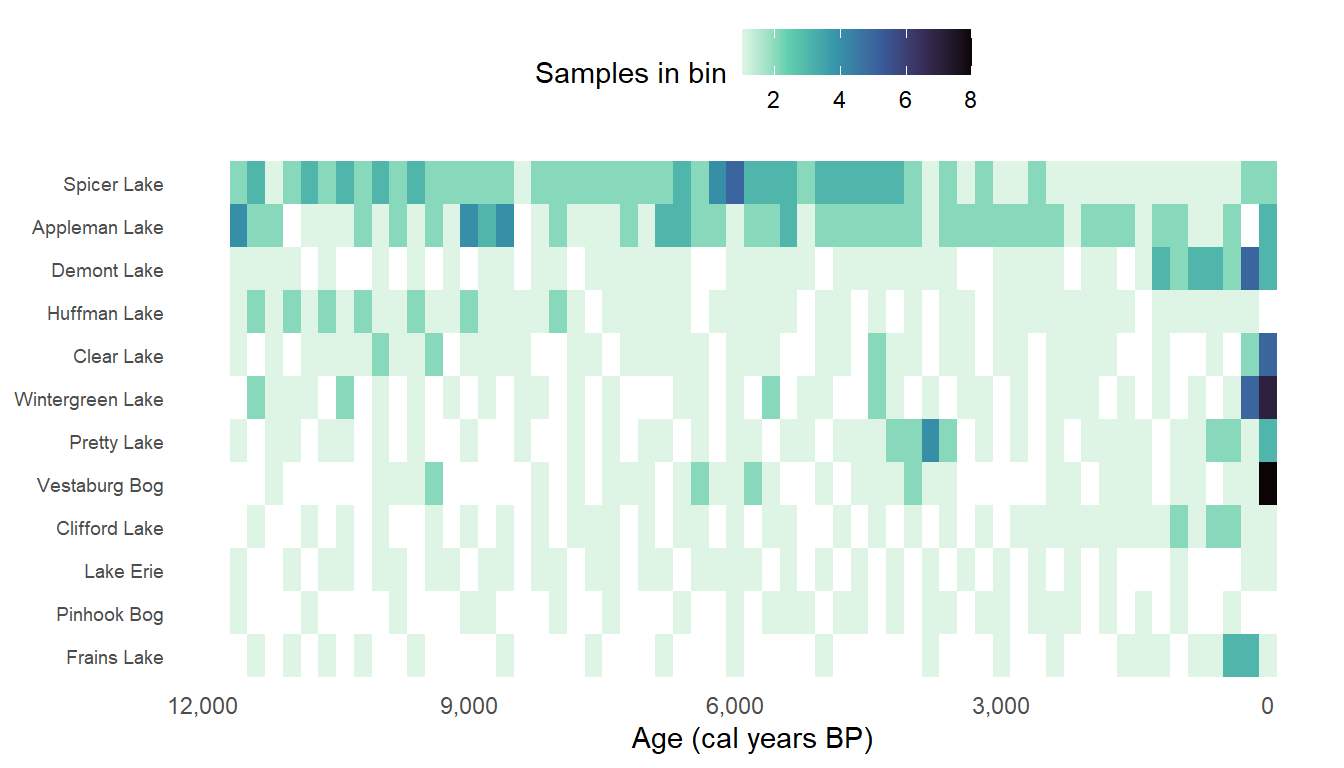
4.4.5 Where are taxa present?
Bearing in mind that we have glossed over the quality of each site’s chronology, it is still worth looking at another plot to demonstrate how data from Neotoma can be explored. The following code once again filters for the most abundant six taxa and records that cover the Holocene, follows the same binning procedure shown above, and creates a table of how many sites record each taxon in each bin.
taxa_by_age <- mich_holo %>%
  dplyr::filter(variablename %in% focal, age >= 0, age < 11700) %>%
  group_by(variablename, age_bin = round(age / 200) * 200) %>%
  summarise(n_sites_with_taxon = dplyr::n_distinct(siteid), .groups = "drop")

sites_by_age <- mich_holo %>%
  dplyr::filter(age >= 0, age < 11700) %>%
  group_by(age_bin = round(age / 200) * 200) %>%
  summarise(n_sites_total = dplyr::n_distinct(siteid), .groups = "drop")

presence <- taxa_by_age %>%
  inner_join(sites_by_age, by = "age_bin") %>%
  mutate(proportion   = n_sites_with_taxon / n_sites_total,
         variablename = factor(variablename, levels = focal))
Before plotting it, look at a summary table:
presence %>%
  group_by(variablename) %>%
  summarise(bins = n(),
            min_prop = min(proportion),
            max_prop = max(proportion),
            bins_at_100pct = sum(proportion == 1),
            .groups = "drop")
# A tibble: 6 × 5
variablename bins min_prop max_prop bins_at_100pct
<fct> <int> <dbl> <dbl> <int>
1 Quercus 59 1 1 59
2 Pinus 59 0.8 1 51
3 Picea 58 0.1 1 7
4 Ulmus 59 1 1 59
5 Fraxinus 59 0.125 0.556 0
6 Betula 59 0.5 1 37Now let’s make a plot:
ggplot(presence, aes(x = age_bin, y = proportion, weight = n_sites_total)) +
  geom_point(size = 1) +
  geom_smooth(method = "gam", formula = y ~ s(x),
              method.args = list(family = "binomial")) +
  facet_wrap(~variablename,
             labeller = as_labeller(taxon_names)) +
  scale_x_reverse(name = "Age (cal years BP)", labels = label_comma()) +
  scale_y_continuous(name = "Proportion of sites recording the taxon",
                     labels = label_percent()) +
  theme_minimal() +
  theme(strip.text = element_marquee())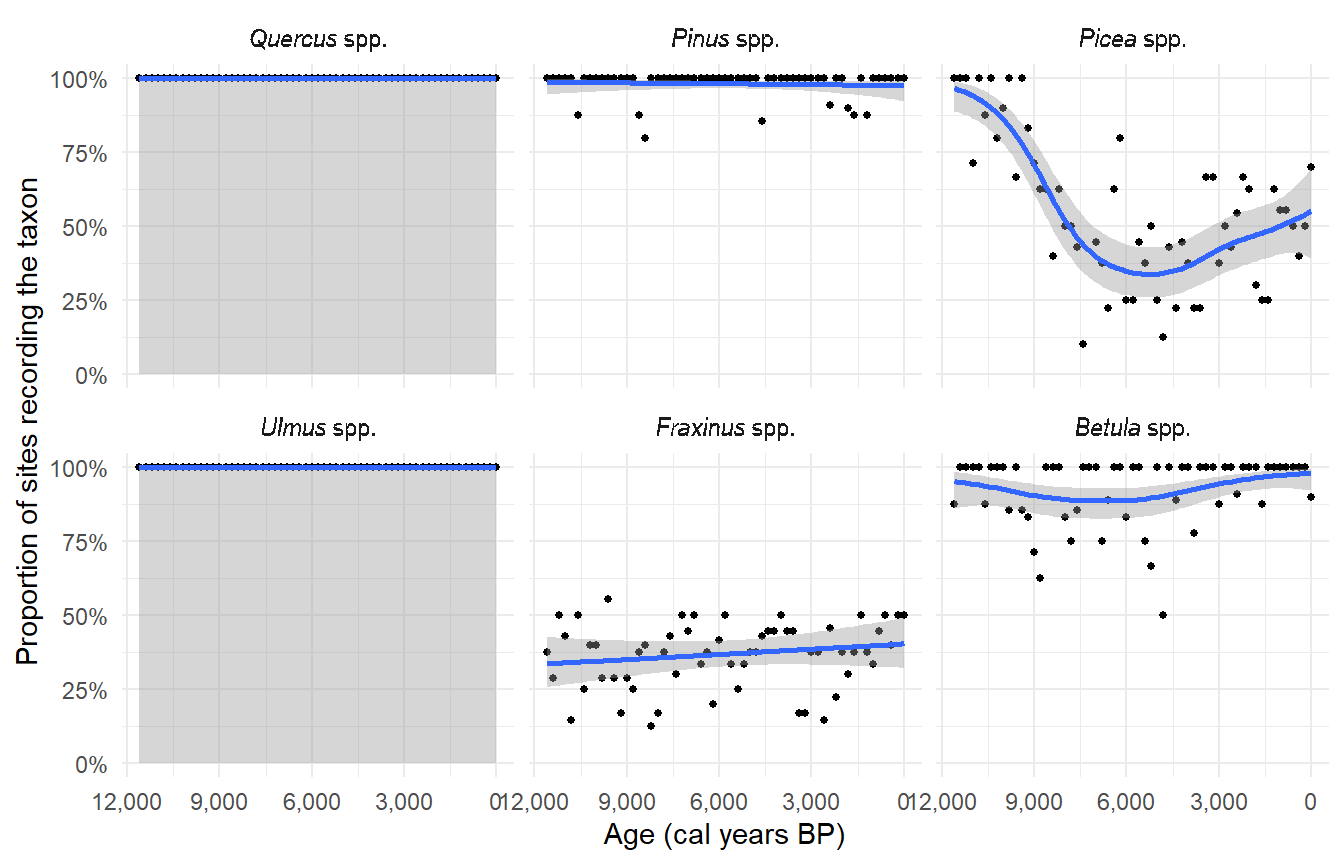
Despite making several assumptions along the way about chronological controls and bin widths (it is advisable to experiment with several different bin widths), some patterns do emerge! Quercus and Ulmus are present at every site in every one of the 56 age bins, and Pinus in 48 of them. The smoother is purely a visual guide, not intended for statistical analyses. Presence is only informative for a taxon that is sometimes absent, which here is Picea, which ranges from 9% to 100% of sites, and Fraxinus, which never exceeds half of them.
NoteAlways remember ecological knowledge! 🧙
Always remember the ecology of a region. It is one thing to play with the numbers from a database, but we could be missing important ecological dynamics. The above example visualises data across Michigan as one, so this approach could be missing those important underlying dynamics. Michigan is split by a climatic tension zone. How would the results change if that knowledge, which is not contained in the downloads, were included?
Exercise 4.3 We have worked through several examples of how data from Neotoma can be manipulated and reshaped to produce data visualisations. This exercise is an open-ended one: either take one of the visualisations above, improve it, and discuss the shortcomings and what issues you addressed, or come up with a visualisation of your own and discuss what you did and why.
There are still many possible visualisations. If you need some inspiration, consider:
- Visualising chronological uncertainty
- Spatial change in taxa (e.g., longitude against abundance)
- Species richness against counting effort
- Some sites include the name of the analyst under
sampleanalyst. Which sites have multiple analysts, and does anything change in the data depending on who the analyst was?
4.5 Conclusion
This chapter is intended to: (i) give you insight into how many ways there are to manipulate and visualise data for different purposes; (ii) highlight pitfalls and potential errors such as ignoring chronological uncertainty or sampling intensity, and also missing ecological knowledge that the database does not contain directly. Some datasets may have associated publications that you can read to understand the methods and regional history. These points are far more important than the code itself which can now be written in minutes by AI. If you are using AI, make sure that every line of code is verified and you know exactly what the output is and how it was created. I take the approach that there are no AI mistakes, only my own misdirection or lack of verification.
The exercises are worth returning to if you skipped them:
- Exercise 4.1, what the
scalesargument does to a stratigraphic plot - Exercise 4.2, what falls away as temporal resolution drops
- Exercise 4.3, improve on one of the examples or come up with a new visualisation