# Load up the package
if (!require("pacman")) install.packages("pacman", repos="http://cran.r-project.org")
pacman::p_load(tidyr, dplyr, ggplot2, scales, stringr, neotoma2, analogue)5 Dissimilarity
5.1 Background
There are multiple methods of describing palaeoecological data in terms of species communities. Older, but still valid, methods include CONISS (Grimm 1987), more modern methods include machine learning methods such as boosted regression trees (Elith et al. 2008; Simpson and Birks 2012), and latent Dirichlet allocation (Blei and Lafferty 2007; Blei 2012). Here, we are going to look at a measure of dissimilarity, the squared chord distance, of samples through time. That is, a measure of how similar or dissimilar the community at one time is to the community at another. In this chapter, we are going to look at how to build a distance matrix of community dissimilarity between every pair of samples in a core. Although we will be using a fairly simple method, dissimilarity/similarity is a fundamental part of many of the more advanced methods, providing a basis for their calculations.
NotePackages required for this section
5.2 Getting started
We will be using the Devil’s Lake dataset downloaded in Chapter 2, filtered for datasettype == "pollen". We will read in the data from the data directory directly so that this section can be run independently of Chapter 2. We’ve also included a catch-up block of code (below) that shows the process of downloading and filtering the data to maintain a reproducible record of the steps required to start this section.
TipRespawn code
This is the same Devil’s Lake download used in Chapter 3, so if you have run that chapter the file is already on disk. The datasettype filter matters more than it looks: site 666 carries five datasets, one of which is a modern pollen surface sample. Downloading without the filter appends that modern sample to the top of the core and it then behaves like the youngest level in the record, which it is not.
# Gated so the API is only contacted if the file is missing. Note the
# datasettype filter: site 666 carries five datasets, and one of them
# (3802) is a modern POLLEN SURFACE SAMPLE rather than part of the core.
# Downloading without this filter silently appends a modern sample to the
# top of a 14,000 year record.
if (!file.exists("./data/devils_dl.rds")) {
  devils_dl <- get_sites(siteid = 666) %>%
    get_datasets(all_data = TRUE) %>%
    neotoma2::filter(datasettype == "pollen") %>%
    get_downloads()
  saveRDS(devils_dl, "./data/devils_dl.rds")
} else {
  devils_dl <- readRDS("./data/devils_dl.rds")
}
Recall from Chapter 2 that samples() extracts the pollen counts from the download (along with lots of other useful variables!), and works offline because get_downloads() already fetched the data and we downloaded them to the data directory. The following code uses the samples() function to convert the downloaded data to a long table of each species recorded per sample and filters for upland herbs and trees and shrubs.
devils_samples <- samples(devils_dl) %>%
  dplyr::filter(ecologicalgroup %in% c("UPHE", "TRSH"), # upland herbs, trees and shrubs
                elementtype == "pollen", # already done at the download stage, so not strictly necessary!
                units == "NISP")                        # counts, not percentages
5.2.1 Harmonising and calculating proportions
Using the samples table, we can perform some simple programmatic harmonisation. Neotoma records Pinus at Devil’s Lake under three names: Pinus undiff., Pinus subg. Pinus and Pinus subg. Strobus. To keep things simple we are going to aggregate all the Pinus species to genus level (e.g., lumping/aggregating all pines together) using str_detect() and replace(). Because the units are still counts at this point we sum the counts.
devils_harm <- devils_samples %>%
  mutate(variablename = replace(variablename,
                                stringr::str_detect(variablename, "Pinus.*"),
                                "Pinus")) %>%
  group_by(siteid, sitename, sampleid, variablename, units,
           age, agetype, depth, datasetid, long, lat) %>%
  summarise(value = sum(value), .groups = "drop")

dplyr::n_distinct(devils_samples$variablename)
[1] 52dplyr::n_distinct(devils_harm$variablename)[1] 50This is possibly over-simplified but good enough for this demonstration. Now that we have done some simple harmonisation, we can convert the pollen count data to relative proportions. Typically (not always) in palaeoecology, data are visualised in relative proportions not counts. Take care over what input the statistical analyses require. In this chapter we use proportions.
devils_harm_prop <- devils_harm %>%
  group_by(age) %>%
  mutate(pollencount = sum(value, na.rm = TRUE),
         prop        = value / pollencount) %>%
  ungroup() %>%
  arrange(desc(age))

# data check: every sample should sum to 1
range(tapply(devils_harm_prop$prop, devils_harm_prop$age, sum))
[1] 1 1We save the harmonised proportions, because later chapters start from this object rather than rebuilding it. It is often useful to keep data on your own backup system rather than relying on data persistence on a server.
saveRDS(devils_harm_prop, "./data/devils_harm_prop.rds")5.3 From long to wide
The data are in long format as a tibble, i.e., similar to a dataframe. This format can be great for data wrangling and plotting; however, many analyses require a specific input such as a wide (variables in columns) site-by-species matrix. It is important to be comfortable with pivoting data between long and wide formats and converting between dataframes/tibbles and matrices. Remember, that unlike dataframes and tibbles, matrices cannot be of mixed type (e.g., strings and numbers).
WarningOh no! 😱
Many statistical functions in R want a matrix, not a tibble or a dataframe (or other class), and analogue::distance() is one of them. Always check the package or function documentation (using ?) for the required input format, because reshaping the data or changing its class may be necessary.
Functions should error if given the wrong input type; however, sometimes they will silently produce the incorrect result. As an example, R will coerce numbers to characters if there is a single character column (like a naming column) in the matrix, and it does so without any error or warning. The coercion can go unnoticed when converting from a dataframe to a matrix, leaving you with a matrix that looks right and is the wrong type:
string_matrix <- matrix(c("1", 2:10), nrow = 2) # see the numbers are in quotes indicating a string?
str(string_matrix) # Check the structure
chr [1:2, 1:5] "1" "2" "3" "4" "5" "6" "7" "8" "9" "10"Numeric matrix:
numeric_matrix <- matrix(1:10, nrow = 2) # now the structure is int, for integer.
str(numeric_matrix) # Check the structure
int [1:2, 1:5] 1 2 3 4 5 6 7 8 9 10Matrices can have row and column names (e.g., species names) and maintain a numeric structure, for example: colnames(numeric_matrix) <- LETTERS[1:5]. Check what you are about to pass in with class() and str().
The analogue package provides several distance measures that can be calculated for site-by-species matrices, we will use squared chord distance. So let’s pivot our data to wide format and convert it to a numeric matrix. This can be done in several ways in R, for consistency’s sake we’ll use tidyr:
devils_samples_wide <- devils_harm_prop %>%
    tidyr::pivot_wider(id_cols = c(age, depth),
                       names_from = variablename,
                       values_from = prop,
                       values_fill = 0) %>% # Replace NA with 0 (see note below)
    as.matrix()

# Some species were not recorded at certain depths (e.g., Acer at depth 603)
# one must be careful when replacing NA with 0 as 'not observed' is different to a measurement of 0
# in this case we can safely say that the proportion of Acer was 0 at a depth of 603

devils_ad <- devils_samples_wide[ , c(1:2)] # store the ages and depths separately

devils_samples_wide <- devils_samples_wide[ , -c(1:2)] # drop ages and depth as they are not included in the distance calculations
5.4 Calculating dissimilarity
Now we have our data in the correct format to do the distance calculation. Note that time is not included as part of the calculation. The age and depth columns have been stored in a separate matrix devils_ad, and the squared chord distance will be calculated on the species community matrix devils_samples_wide.
# Here we use method = "SQchord", see other available methods with ?distance
devils_sqdist <- analogue::distance(devils_samples_wide, method = "SQchord")
Print the first 5 rows and columns to see the structure:
devils_sqdist[1:5, 1:5] 1 2 3 4 5
1 0.0000000 0.12303375 0.16807049 0.16763911 0.16863865
2 0.1230338 0.00000000 0.09150351 0.06611174 0.10351145
3 0.1680705 0.09150351 0.00000000 0.12078176 0.07946106
4 0.1676391 0.06611174 0.12078176 0.00000000 0.10291118
5 0.1686386 0.10351145 0.07946106 0.10291118 0.00000000The distance function has returned a matrix of 122 x 122 dimensions. Note that the input dimensions were 122 x 50. The function has calculated the distance between all pairwise samples, that is, every combination of 1 to \(n\) samples. The diagonal of the matrix is each sample compared with itself and has values of zero. The upper and lower halves of the matrix mirror each other.
One way we can visualise these data is by picking an origin from which to compare change, and re-appending the time column (although, see the cautions below of this crude method). If we use the base of the core, the oldest sample, as our origin, we can look at how far the community moved away from that starting point as time runs forward to the present. The respawn code sorted the samples oldest first, so the oldest sample is the first row and column of devils_sqdist. Note that indexing by position like this only works if you know how your data are sorted. Let’s bind that first column with our stored ages and depths, and plot distance over time.
# Bind the age and depths variables with the first column of the SQdistances
origin_base <- cbind(devils_ad, sq_dist = devils_sqdist[ ,1])
origin_base %>%
as_tibble() %>%
ggplot(aes(x = age, y = sq_dist)) +
geom_point() +
geom_line() +
scale_x_reverse(breaks = scales::pretty_breaks(6)) +
labs(x = "Age (cal years BP)",
y = "Squared chord distance from the base of the core") +
theme_minimal()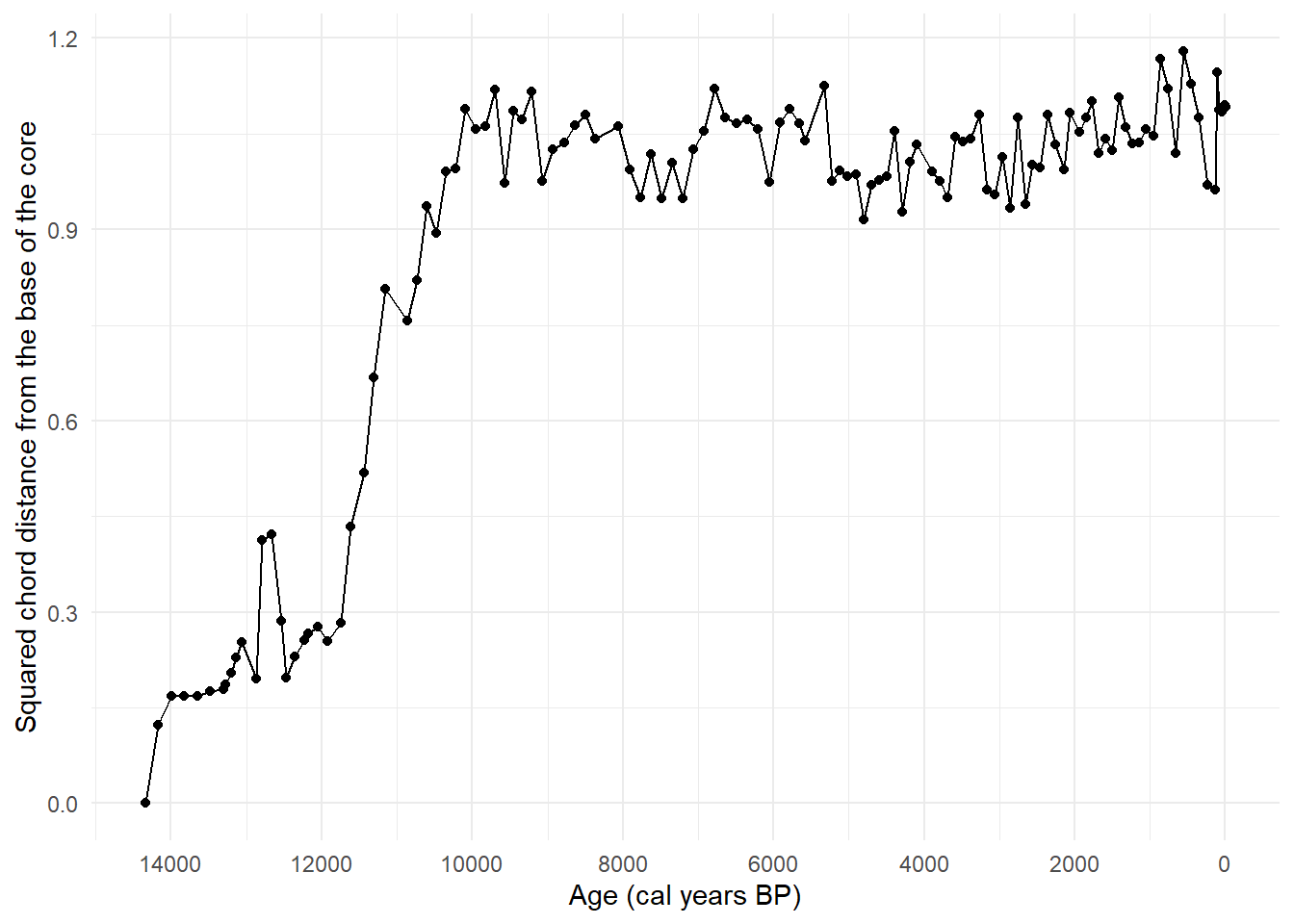
We can see from Figure 5.1 that the community at Devil’s Lake changed substantially over the record, moving progressively further from the composition at the base of the core. Check out the pattern shown by applying the Modern Analogue Technique in Chapter 6 and how it compares to this plot.
However, plotting the distances with the original time column is not a time series analysis and does not take into account structural processes or autocorrelation. As an exploratory method, it shows us patterns that may be of interest to investigate further.
Exercise 5.1 Figure 5.1 measures every sample against one fixed origin (the oldest sample). A different question is how much the community changed between one sample and the next.
Those values are already in devils_sqdist. The diagonal holds each sample compared with itself, so the comparisons between neighbouring samples sit immediately above (or below) it.
Extract the values one step off the diagonal and plot them against age.
Compare your plot with Figure 5.1. Which parts of the record look like periods of rapid change, and would you have picked out the same intervals from the origin plot alone?
We might expect a longer gap between two samples to show a larger change, simply because more time has passed. Use
diff()on the age column to get the gaps and check whether that is true here. Is the relationship what you expected, and what might explain it?
Be careful with the lengths. If you bind 122 values onto the 123 rows of devils_ad, R will not stop you: it recycles the shorter vector and gives you a full table with only a warning. That is worse than an error, because the plot still appears and one value in it is wrong. Check the lengths yourself before you bind anything.
5.5 Limitations of this method
Some considerations of this method are:
- it does not take into account time intervals or chronological uncertainty. Palaeoecological data are typically unevenly spaced through time and we may not be calculating the squared chord distance across communities evenly through time. See the age column in the data; you can use
diff()to see the first differences in the data (the timespan between samples). - time averaging is not taken into consideration. Time averaging is the amount of time a sample (i.e., a 1-centimetre thick slice of sediment core) encompasses. Due to processes like variable sedimentation rates and core compression, the number of years integrated within each sample may vary. Thus, we may be calculating the dissimilarity between say 50-years worth of ecological productivity and turnover in one sample, with 10-years in the previous one.
- the calculations are based on species composition alone and are not conditioned on environmental covariates (e.g., climate variables or fire). Thus, this method can be considered descriptive rather than inferential.
Squared chord distance is one of many measures of dissimilarity, and is not necessarily the best for a given dataset (see Simpson 2007). The documentation of the distance function (accessed by ?distance) lists the alternatives. The vegan package also includes functions for calculating distance, and provides many useful references in the documentation of the function vegdist.
Exercise 5.2 The choice of metric is a decision, not a default, and it changes the answer.
Use
?distanceto see the methodsanalogue::distance()accepts, then pick one other thanSQchordand recalculate the distance matrix. Note thatchordis closely related to squared chord distance, so choose something further afield, such aseuclidean, if you want to see a real difference.Plot your new distance-from-origin curve alongside the squared chord version. Check the range of each before you put them on the same axes: different metrics are not on a common scale, so a shared axis will make one look uniformly larger than the other for reasons that have nothing to do with ecology. Decide how to handle that, and justify what you did.
Do the two metrics agree about when the community changed, even where they disagree about how much? That is usually the more useful question of the two.
Exercise 5.3 So far we have been using Devil’s Lake as an example, try calculate the squared chord distance:
Find another site with pollen data, either with
neotoma2as in Chapter 2 or through Neotoma Explorer, and note itssiteid.Run the respawn code with your site in place of
666. Expect to change more than thesiteid. The code filters on the ecological groupsUPHEandTRSH, onelementtype == "pollen"and onunits == "NISP", and it harmonises everything matchingPinus.*into a single taxon. Your record may not have all of those, and it will almost certainly need different harmonisation. Look at what you actually have before you filter, and keep a note of every decision you make on the way.Build the distance matrix and the distance-from-origin plot for your site, and put it next to Devil’s Lake.
The harder question. The two records have different taxa, different numbers of samples, different sampling intervals and separately built chronologies. Given all that, what can you honestly conclude by comparing the two curves, and what would you have to do first before comparing the absolute values?
5.6 Conclusion
Despite the limitations of this method, it is a useful exploratory tool to visualise how the community composition has changed through time. In the Devil’s Lake example, quite a stark change can be seen over the record, and this can provide a basis for further investigation.
The exercises take that further, and are worth returning to if you skipped them:
- Exercise 5.1, change between neighbouring samples rather than from a fixed origin
- Exercise 5.2, and how much the choice of metric matters
- Exercise 5.3, applying the whole workflow to a record of your own