# Load up the package
if (!require("pacman")) install.packages("pacman", repos="http://cran.r-project.org")
pacman::p_load(dplyr, neotoma2, geojsonsf, leaflet, DT, stringr)2 The neotoma2 package
2.1 Background
This chapter gives you hands-on practice with the neotoma2 R package (Goring et al. 2015), both for practical reasons and for the insight it gives into how open-data systems work. It is a condensed version of the Neotoma workshop, focusing on the data structures and the core functions for downloading and manipulating data. A hard-won lesson for any practising data scientist is how much time and attention go into data handling.
If you plan to work with Neotoma beyond this book, the Slack workspace has a channel for questions about the R package, and you can contact us to join the Google Groups mailing list.
In this chapter you will learn how to:
Search for sites by name and by geographic area
Filter those results by dataset type and by age
Obtain the sample data for the datasets you selected
Harmonise taxon names into groups you can analyse
2.2 Getting started with neotoma2
The primary purpose of neotoma2 is to pass data from the Neotoma Paleoecology Database (Neotoma DB) server into your local R environment. neotoma2 has a layered structure of core functions for obtaining data:
- sites
- datasets
- downloads
- samples
There are many more functions for manipulating data and conducting other operations that we will encounter along the way while we take you through these four data layers. For this chapter we use several packages, and we can load them all at once with the pacman package, which installs anything you do not already have.
NotePackages required for this section
2.2.1 What the package is actually doing
neotoma2 is a thin wrapper around an application programming interface, or API. Every function that fetches something builds a web address, sends it to Neotoma’s servers, and parses the reply. Nothing more mysterious than that. You can see the whole mechanism by looking at the address. When you call a function in R like get_sites(sitename = "Devils Lake"), the package assembles the following address and requests it:
https://api.neotomadb.org/v2.0/data/sites?sitename=Devils%20Lake
Open that link. Your browser will show the raw reply, a block of JSON beginning {"status":"success","data":[..., and inside it you will find "siteid":666 along with the site description and coordinates. That is precisely what get_sites() receives and turns into a sites object for you.
Two details in that address are worth noticing, because they explain behaviour you will meet later:
- The
%20stands for the space in “Devils Lake”. Addresses cannot contain spaces, so characters outside a small permitted set are written as%followed by a code. The wildcard searchsitename = "%Devil%"therefore travels as https://api.neotomadb.org/v2.0/data/sites?sitename=%25Devil%25, because the percent sign itself has to be encoded, as%25. Try that one too and compare the results. - Everything you ask for has to fit in the address. Web addresses have a length limit, which is why very long or intricate spatial searches fail rather than being sent, as we will see in the next section.
Because the data live on someone else’s server, your code depends on that server being reachable. If a call fails for no apparent reason, check the service before debugging your own code: neotoma2::pingNeotoma() returns a status of 200 when the API is answering, and anything else, or a timeout, means the problem is not in your script. Neotoma does occasionally go down for maintenance, which is one reason this book saves downloaded data into data/ rather than fetching it afresh on every run.
2.2.2 Good coding practice: explicitly naming packages and functions
Different packages in R are created independently by different teams of developers, and it’s very common for two different packages to use the same function names. This can lead to coding errors if you call a function that you know is in one package, but R guesses wrongly that you wanted a function of the same name from an entirely different package. For example, for a function like filter(), which exists in both neotoma2 and other packages such as dplyr, you may see an error that looks like:
WarningOh no! 😱
Error in UseMethod("filter") :
 no applicable method for 'filter' applied to an object of class "sites"
You can avoid this error by explicitly naming which package has the function that you want to use, through the standard convention of double colons (package.name::function.name). For example, using neotoma2::filter() tells R explicitly that you want the neotoma2 version, not one belonging to another package.
2.3 Finding sites with get_sites()
Many users of Neotoma first want to search and explore data at the site level. There are several ways to find sites in neotoma2, but we think of sites primarily as spatial objects. They have names, locations, and are found within geopolitical units. However, sites themselves do not have associated information about taxa, dataset types, or ages. sites instead are simply the container into which we add that information. So, when we search for sites we can search by:
- siteid
- sitename
- location
- altitude (maximum and minimum)
- geopolitical unit
2.3.1 Searching by site name
We may know exactly what site we’re looking for (“Devil’s Lake”), or have an approximate guess for the site name (for example, we know it’s something like “Devil Pond”, or “Devil’s Hole”).
We use the general format: get_sites(sitename="XXXXX") for searching by name.
PostgreSQL (and the API) uses the percent sign as a wildcard. So "%Devil%" would pick up “Devils Lake” for us (and would pick up “Devil’s Canopy Cave”). Note that the search is case-insensitive, so "%devil%" will work. Note also that Neotoma spells this particular site without an apostrophe, which is why the wildcard is useful.
If we want an individual record we can use the siteid, which is a unique identifier for each site: devils_lake <- neotoma2::get_sites(siteid = 666).
TipGood practice tip
Every call to get_sites(), get_datasets() and get_downloads() goes over the network to the Neotoma servers. Re-running them on every attempt is slow, and it puts needless load on a shared community resource. So from here on we save each result into data/ the first time and read it back afterwards. The if (!file.exists(...)) wrapper around the calls below does exactly that. Delete the .rds file if you want to force a fresh download.
if (!file.exists("./data/devil_sites.rds")) {
  devil_sites <- neotoma2::get_sites(sitename = "%Devil%")
  saveRDS(devil_sites, "./data/devil_sites.rds")
} else {
  devil_sites <- readRDS("./data/devil_sites.rds")
}

neotoma2::plotLeaflet(devil_sites)
Exercise 2.1 How many sites have “clear” in the name? Show your code and give the total count.
2.3.2 Searching by location
The neotoma package used a bounding box for locations, structured as a vector of latitude and longitude values: c(xmin, ymin, xmax, ymax). The neotoma2 R package supports both this simple bounding box and also more complex spatial objects, using the sf package. Using the sf package allows us to more easily work with raster and polygon data in R, and to select sites using more complex spatial objects. The loc parameter works with the simple vector, WKT, geoJSON objects and native sf objects in R. Note, however, that the neotoma2 package is a wrapper for a simple API call using a URL (see Section 2.2.1), and a URL can only be so long, so the API cannot accept very long or intricate spatial objects.
As an example of the different ways you can search by location, say you wanted every site in the state of Michigan. Below are four descriptions of the same area, each in a format that the loc argument accepts. Only the GeoJSON is used in the search that follows, and the sf object is used further down to draw the outline on a map, but any of the four would work as the search input.
# GeoJSON
mich_geojson <- '{"type": "Polygon",
        "coordinates": [[
            [-86.95, 41.55],
            [-82.43, 41.55],
            [-82.43, 45.88],
            [-86.95, 45.88],
            [-86.95, 41.55]
            ]]}'

# Well-known text (WKT)
mich_wkt <- 'POLYGON ((-86.95 41.55,
                       -82.43 41.55,
                       -82.43 45.88,
                       -86.95 45.88,
                       -86.95 41.55))'

# Bounding box, as c(xmin, ymin, xmax, ymax)
mich_bbox <- c(-86.95, 41.55, -82.43, 45.88)

# sf polygon, converted from the GeoJSON above
mich_sf <- geojsonsf::geojson_sf(mich_geojson)[[1]]

if (!file.exists("./data/mich_sites.rds")) {
  mich_sites <- neotoma2::get_sites(loc = mich_geojson, all_data = TRUE)
  saveRDS(mich_sites, "./data/mich_sites.rds")
} else {
  mich_sites <- readRDS("./data/mich_sites.rds")
}
You can always simply plot() the sites objects, but this won’t show any geographic context. The neotoma2::plotLeaflet() function returns a leaflet() map, and allows you to further customize it, or add additional spatial data (like our original bounding polygon, mich_sf, which works directly with the R leaflet package):
neotoma2::plotLeaflet(mich_sites) %>%
  leaflet::addPolygons(map = .,
                       data = mich_sf,
                       color = "green")
Exercise 2.2 Which state has more sites in Neotoma, Minnesota or Wisconsin, and how many does each have? Show your code and the answer.
2.3.3 Helper functions for site searches
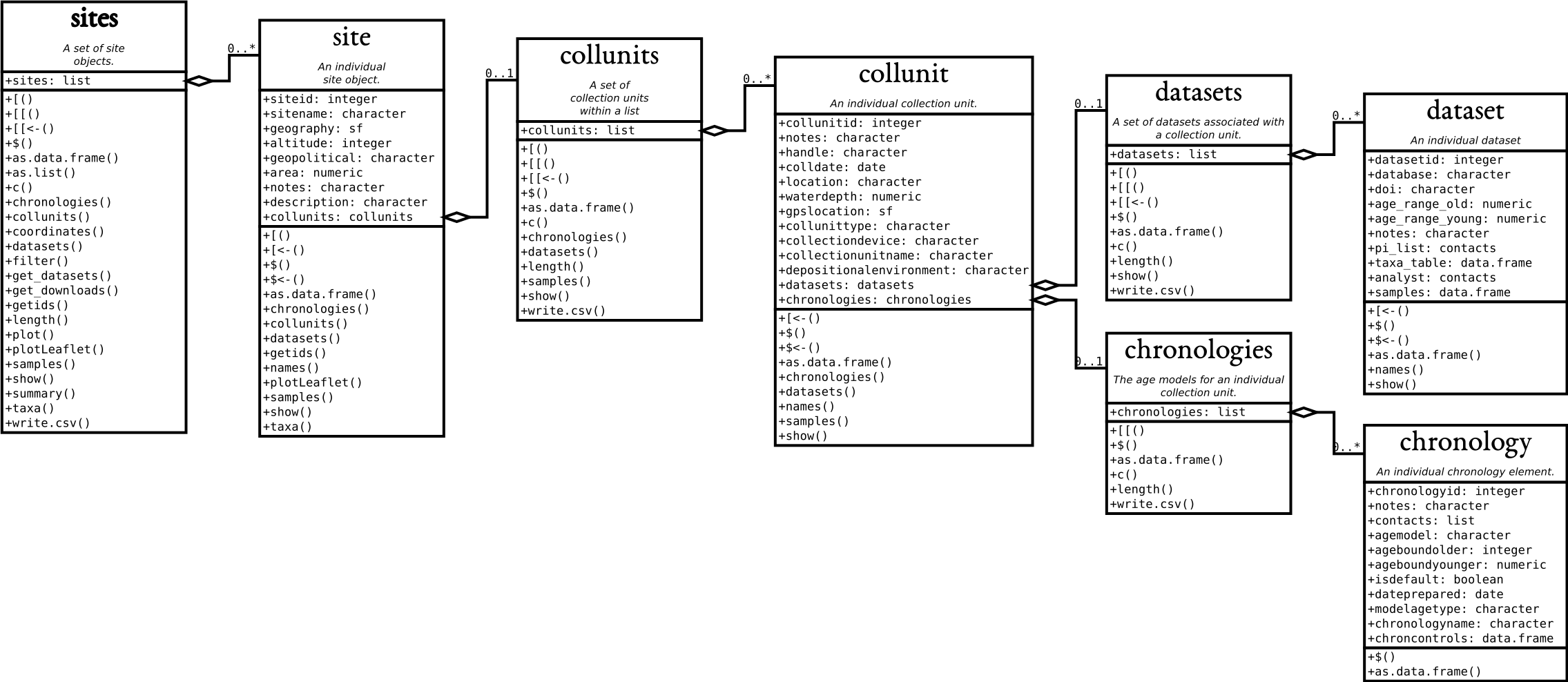
If we look at the UML diagram for the objects in the neotoma2 R package, we can see that there is a set of functions that can operate on sites. As we add to sites objects, using get_datasets() or get_downloads(), we are able to use more of these helper functions. We can use functions like summary() to get a more complete sense of the types of data in this set of sites.
The following code gives the summary table. We do some R magic here to change the way the data are displayed (turning it into a datatable() object using the DT package), but the main function is the summary() call.
mich_sites %>%
  neotoma2::filter(!is.na(datasettype)) %>%
  neotoma2::summary() %>%
  DT::datatable(data = ., rownames = FALSE,
                options = list(scrollX = "100%", dom = 't'))
We can see that there are no chronologies associated with the sites object. This is because, at present, we have not pulled in the dataset information we need. All we know from get_sites() are the kinds of datasets we have.
2.4 Finding datasets
Now that we know how to search for sites, we can start to search for datasets. In the Neotoma data model, each site can contain one or more collection units, each of which can contain one or more datasets. A sites object mirrors that: it contains collectionunits, which contain datasets. From the table above we can see that some of the sites contain pollen data. So far, though, we have only downloaded the sites object and none of the actual pollen; for convenience the sites API returns a little information about the datasets, which makes the records easier to navigate.
With a sites object we can directly call get_datasets(), to pull in more metadata about the datasets. At any time we can use datasets() to get more information about any datasets that a sites object may contain:
if (!file.exists("./data/mich_datasets.rds")) {
  mich_datasets <- neotoma2::get_datasets(mich_sites, all_data = TRUE)
  saveRDS(mich_datasets, "./data/mich_datasets.rds")
} else {
  mich_datasets <- readRDS("./data/mich_datasets.rds")
}

neotoma2::datasets(mich_datasets) %>%
  as.data.frame() %>%
  DT::datatable(data = .,
                options = list(scrollX = "100%", dom = 't'))
Exercise 2.3 How many different kinds of dataset are available at Devil’s Lake, Wisconsin? Show your code and the answer, and make sure your code retrieves datasets for that single site only.
2.4.1 Filtering records
If we choose to pull in information about only a single dataset type, or if there is additional filtering we want to do before we download the data, we can use the neotoma2::filter() function. For example, if we only want pollen records, and only those with known chronologies, we can filter:
mich_pollen <- mich_datasets %>%
  neotoma2::filter(datasettype == "pollen" & !is.na(age_range_young))

neotoma2::summary(mich_pollen) %>%
  DT::datatable(data = .,
                options = list(scrollX = "100%", dom = 't'))
Note that we are filtering on two conditions. (You may want to look up the operators being used in the above code: ==, &, and ! to understand what they accomplish in the code.) We can see now that the data table looks different, and there are fewer total sites.
Exercise 2.4 How many pollen sites are there in Michigan?
This sounds like one question but it has several defensible answers, so give a number for each of the following and say in one sentence why they differ:
- sites returned by the
get_sites()call above, - collection units contained in those sites,
- sites still present after
get_datasets(), - sites left after the pollen-and-chronology filter.
Which of those four would you report in a paper, and what would you have to say about the other three?
2.5 Retrieving samples
The sample data are what scientists usually want: counts of pollen grains, lists of vertebrate fossil occurrences, and so on. Sample data can be large, because each dataset may contain many samples, and that strains both server bandwidth and local memory. So we call get_downloads() after we have done our preliminary filtering. After get_datasets(), you have enough information to filter based on location, time bounds, and dataset type. When we move to get_downloads() we can do more fine-tuned filtering at the analysis unit or taxon level.
The following command may take a few moments the first time it runs, because it downloads the sample data for every dataset that survived the filter. After that it reads the saved copy from data/.
if (!file.exists("./data/mich_dl.rds")) {
  mich_dl <- mich_pollen %>% neotoma2::get_downloads(all_data = TRUE)
  saveRDS(mich_dl, "./data/mich_dl.rds")
} else {
  mich_dl <- readRDS("./data/mich_dl.rds")
}
Once we’ve downloaded the sample data, we now have information for each site about all the associated collection units, the datasets, and, for each dataset, all the samples associated with the datasets. To extract all the samples we can call:
allSamp <- neotoma2::samples(mich_dl)When we’ve done this, we get a data.frame that is 42884 rows long and 39 columns wide. We are returning data in a long format. Each row contains all the information you should need to interpret it; of those columns, variablename and value hold the measurement itself for a given taxon:
 [1] "age"             "agetype"         "ageolder"        "ageyounger"
 [5] "chronologyid"    "chronologyname"  "units"           "value"
 [9] "context"         "element"         "taxonid"         "symmetry"
[13] "taxongroup"      "elementtype"     "variablename"    "ecologicalgroup"
[17] "analysisunitid"  "sampleanalyst"   "sampleid"        "depth"
[21] "thickness"       "samplename"      "datasetid"       "database"
[25] "datasettype"     "age_range_old"   "age_range_young" "age_units"
[29] "recdatecreated"  "datasetnotes"    "siteid"          "sitename"
[33] "lat"             "long"            "area"            "sitenotes"
[37] "description"     "elev"            "collunitid"
For some dataset types, or some analyses, a number of these columns will not be needed; for others they are critically important. To allow the neotoma2 package to be as useful as possible for the community we’ve included as many as we can.
2.5.1 A first look at the samples
That is a lot of table, so it is worth seeing some of it. Each row is one taxon in one sample: where it came from, how deep, how old, what was counted, in what units, and how much of it.
The samples table contains all the necessary information for plotting data over time and space, for rebuilding chronologies (see Section 3.5), and anything else you need to do. It is also the largest in terms of memory, and so it is worth saving to disk to avoid repeated get_downloads() calls.
One column repays a closer look before you aggregate anything. Most rows are NISP, the number of identified specimens, which is a plain count of pollen grains, but the same value column also carries concentrations (grains/ml), volumes (ml, cm^3) and masses (g). Summing value without first restricting to a single unit therefore adds grain counts to millilitres, and it does so silently rather than raising an error. Summed blindly, the average sample here appears to hold over four thousand grains; restricted to NISP the figure is nearer three hundred and fifty, which is what a palynologist would expect at the microscope. This is why the harmonisation code below keeps units among its grouping variables.
2.5.2 Extracting taxa
If you want to know what taxa we have in a dataset, you can use the helper function taxa() on the sites object. The taxa() function gives us not only the unique taxa but two additional columns, sites and samples, counting how many sites and how many samples each taxon appears in. Together they give a sense of how common a taxon is.
neotomatx <- neotoma2::taxa(mich_dl)

head(neotomatx, n = 20) %>%
  DT::datatable(rownames = FALSE,
                options = list(scrollX = "100%", dom = 't'))
The taxonid values can be linked to the taxonid column in the output of samples(). This allows us to build taxon harmonisation tables if we choose to. Note also that the taxonname is in the field variablename. Individual sample counts are reported in Neotoma as variables. A “variable” may be either a species for which we have presence or count data, a geochemical measurement, or any other proxy, such as charcoal counts. Each stored entry for a variable includes the units of measurement and the value.
2.5.3 Taxonomic harmonisation
A standard challenge in Neotoma (and in biodiversity research more generally) is that different scientists use different names for taxonomic entities such as species. Even if everyone agrees on a common taxonomy, it’s quite possible that a given fossil might be only partially identifiable, perhaps just to genus or even family. Hence, when working with data from Neotoma, a common intermediate step is to harmonise all the taxon names stored in Neotoma into a set of standard names that suit your question.
Let’s say we want to know the past distribution of Pinus. We want all the various pollen morphotypes associated with Pinus (Pinus strobus, Pinus strobus-type, Pinus undiff., Pinus banksiana/resinosa and so on) grouped into one aggregated taxon named Pinus. This can be done by hand, by exporting the taxon list and editing each entry, or programmatically.
Before changing anything, look at what is actually there. Devil’s Lake and the Michigan sites both record pine under several names, and it is worth seeing the list before deciding to collapse it:
neotomatx %>%
  dplyr::ungroup() %>%
  dplyr::filter(stringr::str_detect(variablename, "Pinus")) %>%
  dplyr::reframe(pinus_spp = unique(variablename)) %>%
  DT::datatable(data = .,
                options = list(scrollX = "100%", dom = 't'))

# The equivalent base R one-liner:
# unique(grep("Pinus", neotomatx$variablename, value = TRUE))
There are 6 of them, and they sit at different levels: some are species, some are the subgenera Pinus and Strobus, and some are simply Pinus undiff. where the analyst could not identify further. They also nest: Pinus strobus is a species within subg. Strobus. That is the problem harmonisation solves. Across many sites, different analysts identified to different levels, so unless you collapse them you are comparing a taxon that means something different at each site.
Now the replacement. We use dplyr to mutate() the column variablename, so that any time we detect (str_detect()) a variablename starting with Pinus (the .* is a wildcard for any character [.], zero or more times [*]) we replace() it with the string "Pinus". Note this changes Pinus in the allSamp object; calling samples() again would return the original taxonomy. We also filter the ecological groups to UPHE (upland herbs) and TRSH (trees and shrubs). More on ecological groups in the Neotoma Online Manual.
allSamp <- allSamp %>%
  dplyr::filter(ecologicalgroup %in% c("UPHE", "TRSH")) %>%
  dplyr::mutate(variablename = replace(variablename,
                                stringr::str_detect(variablename, "Pinus.*"),
                                "Pinus")) %>%
  dplyr::group_by(siteid, sitename,
                  sampleid, variablename, units, age,
                  agetype, depth, datasetid,
                  long, lat) %>%
  dplyr::summarise(value = sum(value), .groups = 'keep')
Note that in the summarise() code, we are summing the raw count data (number of individual grains identified). It is important to take care when converting between counts and proportions that manipulations are done in the correct order and proportions are not accidentally summed, or taxa dropped after converting to proportions resulting in taxa not summing to 1.
NoteThis is a basic demonstration
Collapsing every Pinus morphotype into one taxon is the simplest demonstration of programmatically harmonising taxa, and is not necessarily what you want to do in a given dataset, or across all 29 Michigan sites. The right level to harmonise to depends on the question, on what each analyst recorded, and often on several ecologically relevant decisions. This kind of harmonisation is also within one database, which is the easy case. Matching names across two datasets is a different and much harder problem.
Section 6.3.1 covers decisions we made to build a harmonisation table for Devil’s Lake cross-referenced against the North American Modern Pollen Database (NAMPD).
Exercise 2.5 Follow the Pinus example above, but for Picea. How many taxon names were aggregated into your Picea group?
Exercise 2.6 Now do the same for Devil’s Lake, Wisconsin, the site used throughout the rest of this book. Download it with get_sites(siteid = 666), and find how many Pinus morphotypes it holds.
Then think about what the harmonisation costs you. Two of the names you will have lumped together are Pinus subg. Pinus and Pinus subg. Strobus. These species/subgenera in the upper Midwest might have different habitats, fire responses and successional roles. Look into the ecological roles and functional traits of these species/subgenera and describe a justifiably approach to aggregating/harmonising taxa.
A typical sample yields around twenty taxa from a few hundred grains, and counting effort varies several-fold between samples. Both facts matter later: dissimilarity measures and ordinations are sensitive to how many taxa you have and to how unevenly they were counted, which is why most of them are run on proportions rather than raw counts.
We will explore these data visually, and turn them into pollen diagrams, in Chapter 4.
2.6 Conclusion
We have seen what an API is and what neotoma2 does with one, searched Neotoma for sites by name and by location, inspected the datasets those sites hold, filtered down to the records we wanted, pulled the sample data into R, harmonised a set of pollen morphotypes, and taken a first look at the resulting table. Later chapters build directly on the objects produced here.
Two habits from this chapter are worth carrying forward, because they will save you time and grief later: save downloaded data to disk rather than re-fetching it, and check units before you aggregate anything.
Along the way there were six exercises. If you skipped any, they are worth returning to before moving on, because later chapters assume you are comfortable searching and filtering:
- Exercise 2.1, searching by site name
- Exercise 2.2, searching by geopolitical unit
- Exercise 2.3, inspecting the datasets at a single site
- Exercise 2.4, what “how many sites” actually means
- Exercise 2.5, taxonomic harmonisation
- Exercise 2.6, and what harmonisation costs you